Appearance
Dispatch
Dispatch answers one question for the whole firm: is the follow-up machinery working? What went out, what came back, what failed, and what needs someone to step in.
That is deliberately narrower than it sounds. Deciding what to do about a piece of client work belongs to the Inbox; what a single client still owes you belongs to that client's Requests page. Dispatch is where you find out whether the alerts, reminders and sends behind those surfaces are actually landing.
You do not need to think in terms of system rules to use it. Start with the work that needs attention, then adjust monitoring or reminders only when you need to.
How Dispatch Works
Dispatch watches for accounting situations that need a person, a reminder, or an approval. When something matters, it creates a clear item for the team to review instead of leaving the signal hidden in a report or integration log.
Examples include overdue client uploads, close blockers, failed syncs, approval requests, and recurring follow-up work.
Main Areas
- Overview - the operating picture: how much fired and how much became work, which channels are delivering, what has been sitting open longest, and which recurring sends are due. See Operations Overview.
- Today - the triage inbox: approvals, client blockers, overdue follow-ups, and alerts that need attention now.
- Digests - the summaries that went out, grouped by work type.
- Rules - what Kraal watches for on each client's books, with how often each rule has fired and whether anyone acted on it. See Rules.
- Schedules and Operators - recurring sends and automation guardrails, for administrators.
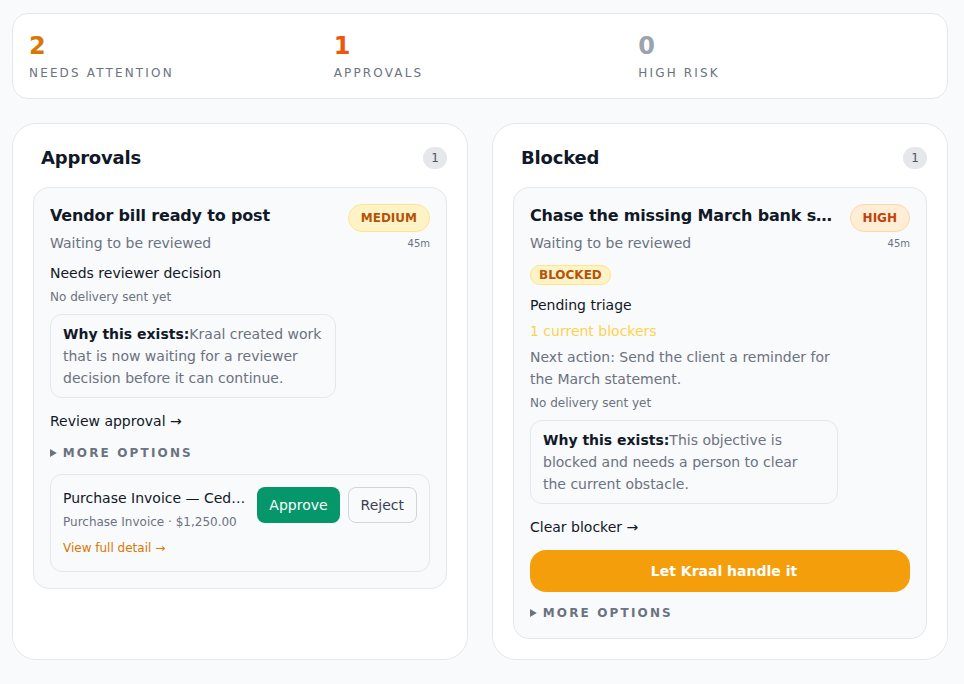
Example data shown. Your inbox shows your own clients and follow-ups.
Entity scope
For a client with more than one entity, the Dispatch sidebar shows an entity selector. Pick an entity to scope the Dispatch view to its books, or leave it on all entities. The selector hides itself for single-entity clients, so there is never a control that does nothing. See Working with Multiple Entities.
How Alerts Reach You
Dispatch items can reach you through Portfolio, the Inbox, Ask Kraal, email, and mobile Dispatch when that is enabled for your workflow.
Email is deliberately split into a selective weekday action briefing for new or changed critical/high work and a weekly activity summary for firm-wide oversight. The two messages have different recipients and are skipped when there is nothing relevant to report. See Email Briefings for the cadence, contents, and routing rules.
AI-Assisted Setup
The goal is for Kraal to help set up common Dispatch behavior instead of making accountants build every rule manually. In normal use, describe the outcome you want, such as:
- "Tell me when a client upload is overdue."
- "Watch this client for close blockers."
- "Remind me every morning about missing bank statements."
- "Pause reminders for this client this week."
Kraal keeps the technical controls behind the scenes. Advanced monitoring and guardrails remain available for teams that need precise control.
Safety
Dispatch is designed to surface and route work, not silently take high-risk accounting actions. Important actions can be held for approval based on your organization's guardrails.
Mobile Access
Dispatch can be added to your phone for faster access to urgent alerts and follow-ups. From the phone you can approve or reject prepared work in one tap, snooze items, and snap photos of receipts, invoices, and expense documents straight into Upload & process for the selected client.
Alerts are the reason to install it: only urgent items ever notify you, and on iPhone and iPad notifications work only once Kraal is on your home screen. Both live in one place — Settings → Kraal on your phone — which stays available whether or not you dismissed the first-run prompt.
See Mobile App Setup for install steps and Using Dispatch on Your Phone for the day-to-day workflow.
When to Use Dispatch
Use Dispatch when:
- You want to see what needs attention today.
- You need client follow-up reminders.
- You want Kraal to watch common accounting risks.
- You need approval-safe automation instead of unmanaged alerts.
Use Portfolio when you want the firm-wide view. Use the Inbox when you are deciding what needs a person. A period-lock request is signed there, under Signatures. Use Dispatch when you want to know whether the follow-up and alert layer is doing its job. Dispatch is not where that lock is signed.